When virus attack on system deeply it is very hard to dig it out. Normal Antivirus software can’t kill virus properly from system. Only stop the virus process, not kill and clean the virus properly. So we need a portable antivirus in to USB drive. The portable antivirus called ‘Rescue Disk’. Today I will share a rescue disk named ‘Kaspersky Rescue disk’. It is official version of Kaspersky Lab. I packed it on a ISO file. You can boot this ISO file using Rufus portable version.
The Rescue disk helps you to remove malicious virus completely from your PC. You can download this rescue disk free by clicking the below button.
System Requirements For Kaspersky Rescue Disk
Before you start Kaspersky Rescue Disk 2019 free download, make sure your PC meets minimum system requirements.
- Operating System: Windows XP/Vista/7/8/8.1/10
- Memory (RAM): 1 GB of RAM required.
- Space Require on Disk: 600 MB
- Processor: 1 GHz Intel Pentium processor or later.

How to boot Kaspersky Rescue Disk?
You can Boot Kaspersky Rescue Disk using Rufus portable version.
1. Only Download this ISO file by clicking above button and open the file in Rufus. (Don’t have Rufus? Don’t worry click below image.)
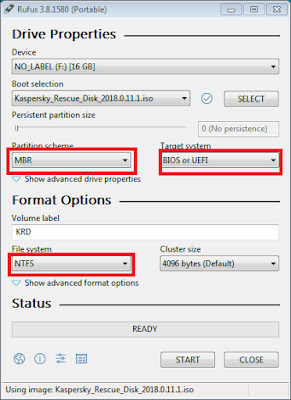
2. Then choose ‘Partition scheme’ as ‘MBR’, ‘Target system’ as ‘BIOS or UEFI’ and ‘File system’ as ‘NTFS’
3. Click on the start button
4. It alerts you to ‘Download Require core.img’.(Only for this Rufus which I’m using) Click on the ‘NO’ button.
5. Then it ask you that ‘are you want to make the drive bootable using ISO image mode or DD image mode?’
6. Choose ‘Write in DD image mode’ and press ‘OK’ button
7. It warned you to format this drive. Press ‘OK’ button to format.
8. After completing formatting and copying files when you see ‘Ready’ message on Rufus progress bar your Pendrive is now ready for Rescue Disk.
 Teck2Know